Incoming invoices and their processing are an integral part of the daily operations of any company. But what if manual processing takes too much time, increases the risk of errors, and slows down your business? Modern technology offers a simple and efficient solution that eliminates now unnecessary manual work.
Automation as the key to efficiency 🚀
With automation, the invoice processing workflow can be faster and more reliable. All you need to do is send the received invoice, either by you or your supplier, to a designated email address, and our Q.Invoice application takes care of the rest:
- Automatic invoice reception: Every incoming invoice is directly uploaded into the application.
- AI data extraction: Artificial intelligence recognizes key data (e.g., supplier, invoice number, due date) and processes it automatically.
- Effortless verification: You only need to check the accuracy of the imported data.
Why switch to digital invoice processing? 💡
- Saves time: Automation eliminates manual work, allowing you to focus on more important tasks.
- Minimizes errors: Human error is often the cause of incorrectly entered data. Automated processes remove these issues.
- Transparency: All invoices are recorded in one place, where you can access them anytime.
- Paperless workflow: Digitalization reduces the need for paper documentation, which is not only eco-friendly but also practical.
How does it work in Q.Invoice?
📩 Invoice reception: You or the supplier send the invoice to a dedicated email address.
📥 Automatic processing: The invoice is automatically uploaded into Q.Invoice.
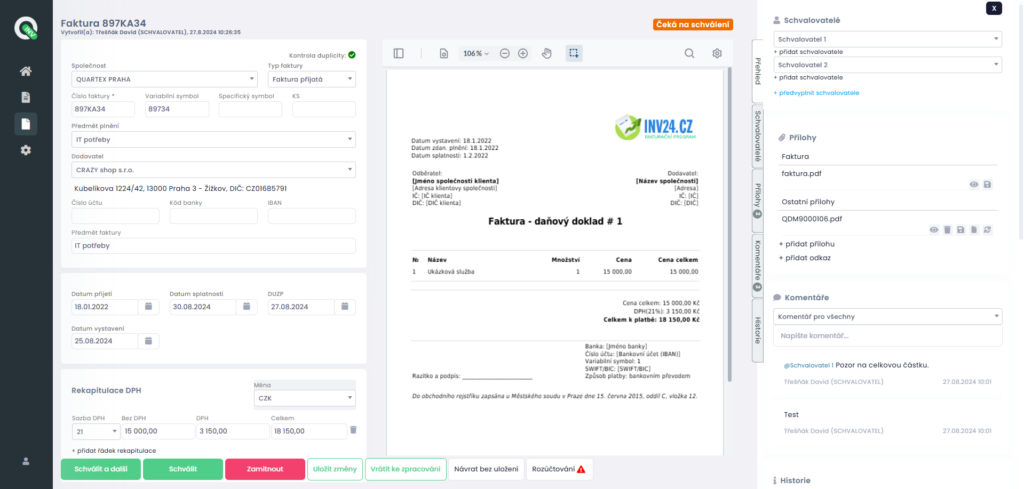
🧠 Data extraction: Artificial intelligence (AI) extracts key data and populates it into the system form.
✔️ Approval: The invoice can go through an approval process, which you can fully customize.
💻 Transfer to accounting: Approved invoices can be automatically sent to your ERP or other accounting software. Q.Invoice can also operate independently.
How to get started?
Start easily. Try Q.Invoice for FREE and discover how simple and fast processing incoming invoices can be without unnecessary stress.