
Planning and approving purchase requests is part of everyday business in every company. Without a well-set approval process, you may find yourself unsuccessfully trying to determine what exactly an incoming invoice you are supposed to approve relates to. With the smart, simple, and accessible solution Requests in Q.Invoice, you can prevent situations such as:
- Lack of transparency: Who approved what and why?
- Unnecessary costs: Purchases outside the budget.
- Delays: Everything takes too long and tasks come to a standstill.
Requests are a simple solution that brings order and streamlines the entire process.
How does purchase request approval work with Q.Invoice?
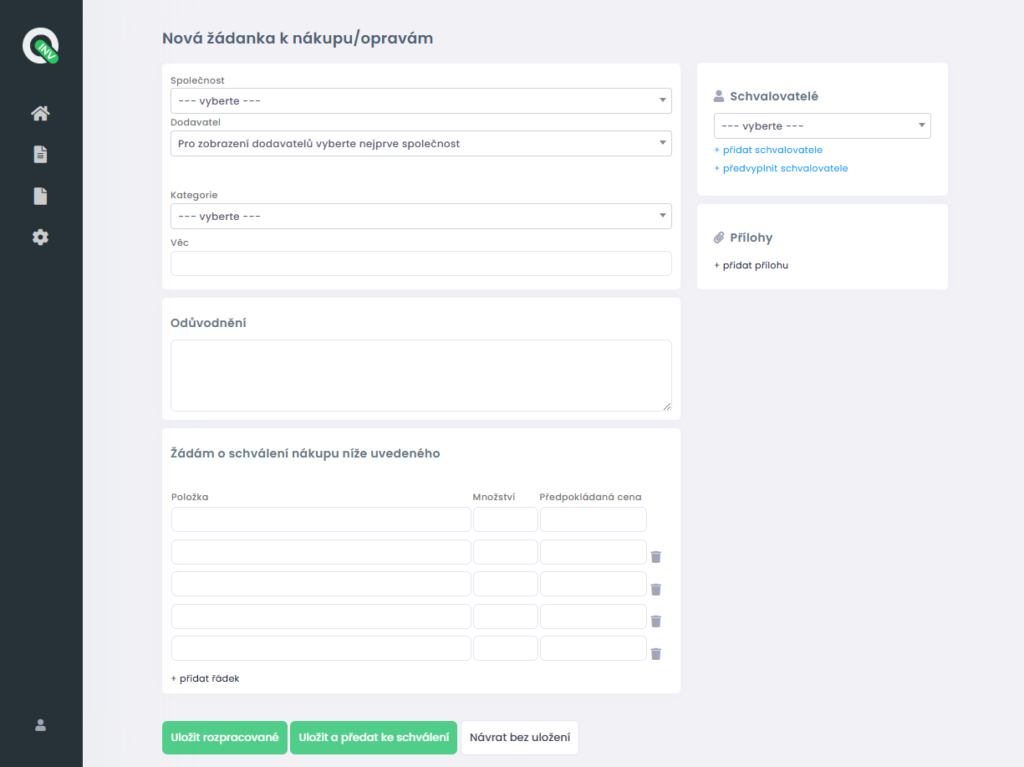
📋 Submitting a Request: An employee creates a simple purchase request with the necessary details.
📬 Notification to the Approver: The responsible person receives an instant notification that something needs approval.
✅❌ Approval Process: The approver can approve, reject, or request additional information.
🔗 Linking to the Invoice: The approved request is automatically linked to the received invoice, making record-keeping and control easier.
What will it bring you?
- Time savings: No more searching for paperwork or digging through emails.
- Clarity: Everything is clear and the process is under control.
- Fewer unnecessary expenses: Purchases are made strictly based on approved requests.
- Easy record-keeping: Every request and its status are always at your fingertips.
Real-life example 🌟
For example, the organization Charita Litoměřice uses the Q.Invoice application and extensively utilizes the Requests (purchase request) feature, replacing manual processes (Excel) with digital approval of both purchases and incoming supplier invoices.
The results?
- Transparency: Purchase requests are clearly recorded and easy to track.
- Cost savings: Unplanned and unnecessary purchases have been eliminated.
- Time savings: No more lengthy searching for who approved a purchase and when.
- Complete archive: All requests and approvals are easily accessible for future review.
How to get started with Q.Invoice?
Q.Invoice makes your daily agenda easier.
Try Q.Invoice for FREE and discover all the benefits for yourself! 🙌